

WordPress的对象缓存是一种缓存由插件和主题设置的瞬态的方法。默认的WordPress对象缓存使用了MySQL数据库,开发人员一直寻找替代方法来将这些瞬变存储在其他位置,以加快WordPress性能。Redis和Memcached都是用于将瞬态存储在RAM中的对象缓存守护程序。
本教程将展示如何安装Memcached服务器和PHP 7扩展,以便WordPress可以与Memcached服务器交互。
安装Memcached服务器
从存储库安装最新的Memcached守护程序和依赖项。
Ubuntu:
sudo apt install libmemcached* memcached libanyevent-perl libyaml-perl libterm-readkey-perl libevent-dev libsasl2-2 sasl2-bin libsasl2-dev php7.0-dev php7.0-json php-igbinary php-msgpack pkg-config libtool-bin build-essential git -yCentos:
yum install memcached
yum install php-memcached
为WordPress配置Memcached
备份原始的Memcached配置文件:
sudo mv /etc/memcached.conf /etc/memcached.conf.bak
创建一个新的Memcached配置文件:
sudo nano /etc/memcached.conf粘贴此memcached配置:
# Run memcached as a daemon. This command is implied, and is not needed for the
# daemon to run. See the README.Debian that comes with this package for more
# information.
-d
# Log memcached\'s output to /var/log/memcached
logfile /var/log/memcached.log
# Be verbose
# -v
# Be even more verbose (print client commands as well)
# -vv
# Start with a cap of 64 megs of memory. It\'s reasonable, and the daemon default
# Note that the daemon will grow to this size, but does not start out holding this much
# memory
-m 50
# Default connection port is 11211
-p 11211
# Run the daemon as root. The start-memcached will default to running as root if no
# -u command is present in this config file
-u memcache
# Specify which IP address to listen on. The default is to listen on all IP addresses
# This parameter is one of the only security measures that memcached has, so make sure
# it\'s listening on a firewalled interface.
-l 127.0.0.1
# Set unix socket which we put in the folder /var/run/memcached and made memcache user the owner
#-s /var/run/memcached/memcached.sock
# set permissions for the memcached socket
#-a 775
# Limit the number of simultaneous incoming connections. The daemon default is 1024
# -c 1024
# Lock down all paged memory. Consult with the README and homepage before you do this
# -k
# Activate optimal options
-o modern
Ctrl + X,Y并按Enter保存并退出
打开Memcached init.d配置文件:
sudo nano /etc/default/memcached确定有下面这一行,以便Memcached启动。
# Set this to no to disable memcached.
ENABLE_MEMCACHED=yes
重新启动Memcached:
sudo service memcached restart安装Memcached PHP 7 PECL扩展
编译Memcached PHP 7 PECL扩展:
sudo apt install php7.0-dev libtool pkg-config php-igbinary php-json php-msgpack -y
cd /tmp
git clone https://github.com/php-memcached-dev/php-memcached -b php7
cd php-memcached
libtoolize
phpize
./configure --prefix=/usr --enable-memcached-igbinary --enable-memcached-json --enable-memcached-msgpack
sudo make
sudo make install
为nginx或Apache启用PHP 7扩展
添加memcached扩展:
echo \"extension = memcached.so\" | sudo tee -a /etc/php/7.0/mods-available/memcached.ini重新启动php7.0-fpm
sudo service php7.0-fpm restart重新启动Apache2或nginx
sudo service apache2 restart安装Memcached WordPress插件(兼容PHP 7.x)
MemcacheD Is Your Friend插件已经六年未更新了,所以此处813站长大咖提供的是在此插件的基础上优化升级的版本,且兼容PHP 7.x。MemcacheD Is Your Friend升级版下载链接: https://pan.baidu.com/s/1PKae47m6m17g4O7X5T-2aw 提取码: 3ici
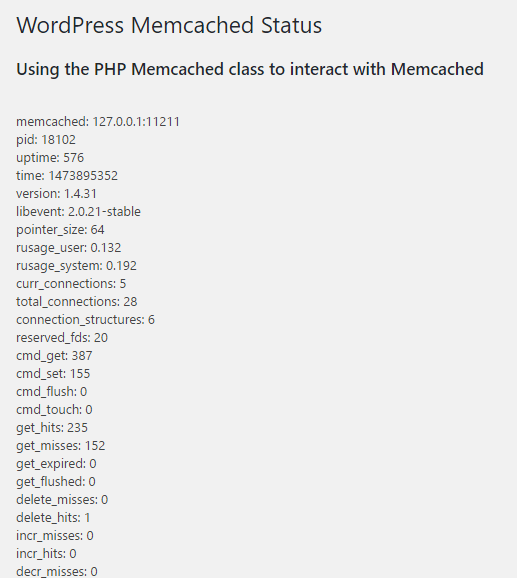
安装并启用插件后,在WordPress后台 “工具 > Memcached”中可以看到以下信息: